 Recordvert
Email to PDF, with review and redaction built in.
Recordvert turns old mailboxes into PDFs you can keep, search and share. If you handle public records requests, it also helps you pick the right emails, redact private details and export a folder that's ready to send.
I built it because I've spent years answering public records requests, and none of the tools I used had the settings and options the job really needs. So I put them in Recordvert. It reads the mail files itself, so you don't need Outlook, Windows or an account.
Who it is for
Anyone who has to find, read or hand over old email, often from files that no mail app will open anymore.
- City and county clerksAnswer records requests for email without uploading anyone's mail.
- Records officersReview each email, redact what the law allows, and keep a record of every decision.
- Small legal teamsTurn a client's mailbox into PDFs with attachments, then narrow it down to the emails that matter.
- Anyone with old mailboxesGet years of saved mail into PDFs you can read, search and keep. No Outlook or Windows needed.
How it works
A plain conversion takes three steps. For a records request, you review the emails before you export.
-
Add your mail
Add PST, OST or mbox files, or a whole folder of them. You can also drag emails straight in from Mail or Outlook.
-
Pick and review
Tick the emails you want, or filter by sender, dates and words. For a records request, you answer each one Yes, No, Further Review or Withhold.
-
Export the PDFs
Recordvert writes the PDFs and a report. After a review, it checks the release and moves anything doubtful to a Needs review folder.
What it can do
If you only need PDFs, the app stays simple. Pick a bigger level when you need more: Just Convert to PDF, Search and Convert, or Public Records.
Convert mail to PDF
- Outlook PST and OST, and mbox from Apple Mail, Gmail Takeout, Thunderbird and others.
- One PDF per email, with From, To, Date and Subject on top.
- Word, Excel, PowerPoint, OpenDocument, Pages, Numbers and Keynote attachments are converted to PDF too, with the original kept beside each.
- File names made from the date, sender and subject, so they sort in order.
- Stop a long run and pick it up later where it left off.
Find what matters
- Filter by sender, recipient, subject, words, dates and attachment type.
- Highlight your search words in the PDFs.
- Group replies into conversations and skip duplicate copies.
- An optional AI check that compares each email with the request. It uses your own AI account, and shows the cost before anything is sent.
Review and redact
- A review window where you answer each email Yes, No, Further Review or Withhold.
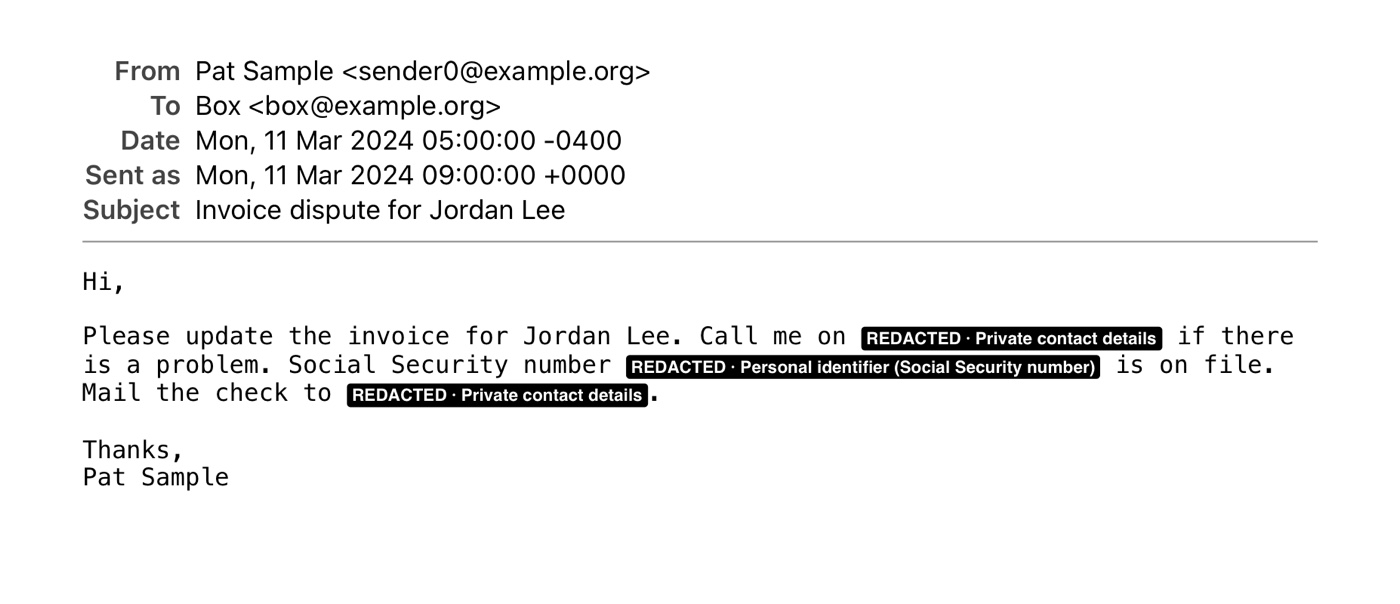
- Spots private details such as phone numbers and Social Security numbers. You choose Redact or Keep for each one.
- Redactions are permanent. Released pages are flattened to images so nothing under a black box can be copied, then made searchable again.
- Check every attachment and picture, and draw black boxes on them where needed.
Check before you hand over
- Three folders: Release (what you send), Needs review, and an internal copy you keep.
- Optional Bates numbers on every page, and PDF/A for long-term storage.
- A final check opens every released file. Anything doubtful goes to Needs review, not Release.
- A redaction log that records what was redacted, why, who decided and when.
- A run summary, and a spreadsheet listing every email and what happened to it.
Your mail stays on your Mac
Recordvert works offline. There's no account and no tracking, and nothing is ever sent to me. Only two optional features use the internet, and both are off until you turn them on: loading pictures from the internet, and the AI relevance check.
The AI check sends the text of the emails being checked to the AI provider you pick, under your own account. You see the estimated cost first, and nothing is sent until you agree. On a Mac with Apple Intelligence, you can choose "This Mac (Apple)" instead, and nothing leaves your Mac.
Recordvert checks its own work, but no tool can promise it caught everything. You make every decision, so always look over the Release folder before you send it.
Pay once
Buy Recordvert once on the Mac App Store. No subscription and no account. If you use the optional AI check with an online provider, that provider bills you directly for what you send it.
Runs on Apple silicon and Intel Macs with macOS 13 Ventura or later.